Claude Desktop setup
This page takes you step by step from zero to your first conversation with the company. Everything is done by clicking — no terminal and nothing to install except Claude Desktop itself. It takes about 10 minutes.
You install the whole company with a single file — the Axpol plugin. A plugin is a package containing skills (knowledge
of how to work with the company) and connectors (connections to the company's systems).
1. Install Claude Desktop
- Go to claude.ai/download and download the version for your computer (Windows or Mac).
- Run the downloaded file and go through the installer.
- Open Claude and sign in with your account.
Account plan. Plugins and several connectors at once require a paid plan (Pro, Max, Team or Enterprise). On the Free plan see setup without the plugin — one connector works there.
2. Enable code execution (needed for skills)
Settings → Capabilities → enable Code execution and file creation (in the newer layout: Create and edit files).
3. Install the Axpol plugin
- Download the file: axpol-plugin.zip. Don't unzip it.
- In Claude open Customize → Plugins → Add (+) → Upload plugin and select the downloaded file.
- Axpol POC appears in the plugin list.
When a new version comes out (e.g. a new company department), download the file again and upload it the same way.
4. Connect the connectors
Open the Axpol POC plugin → Connectors tab. Click Connect next to each axpol-* connector
(no sign-in needed). They cover production, warehouse, finance, complaints and the shop.
So Claude doesn't ask for approval on every read: in the Axpol POC plugin open the Permissions tab
(or Customize → Connectors → an axpol-* connector). For Read-only tools choose Always allow.
Leave the tools that change something (approving a production proposal, publishing to the shop) on
Needs approval — that way you approve every change in the systems yourself. You can also grant it in a chat by
clicking Always allow the first time Claude asks about a given tool.
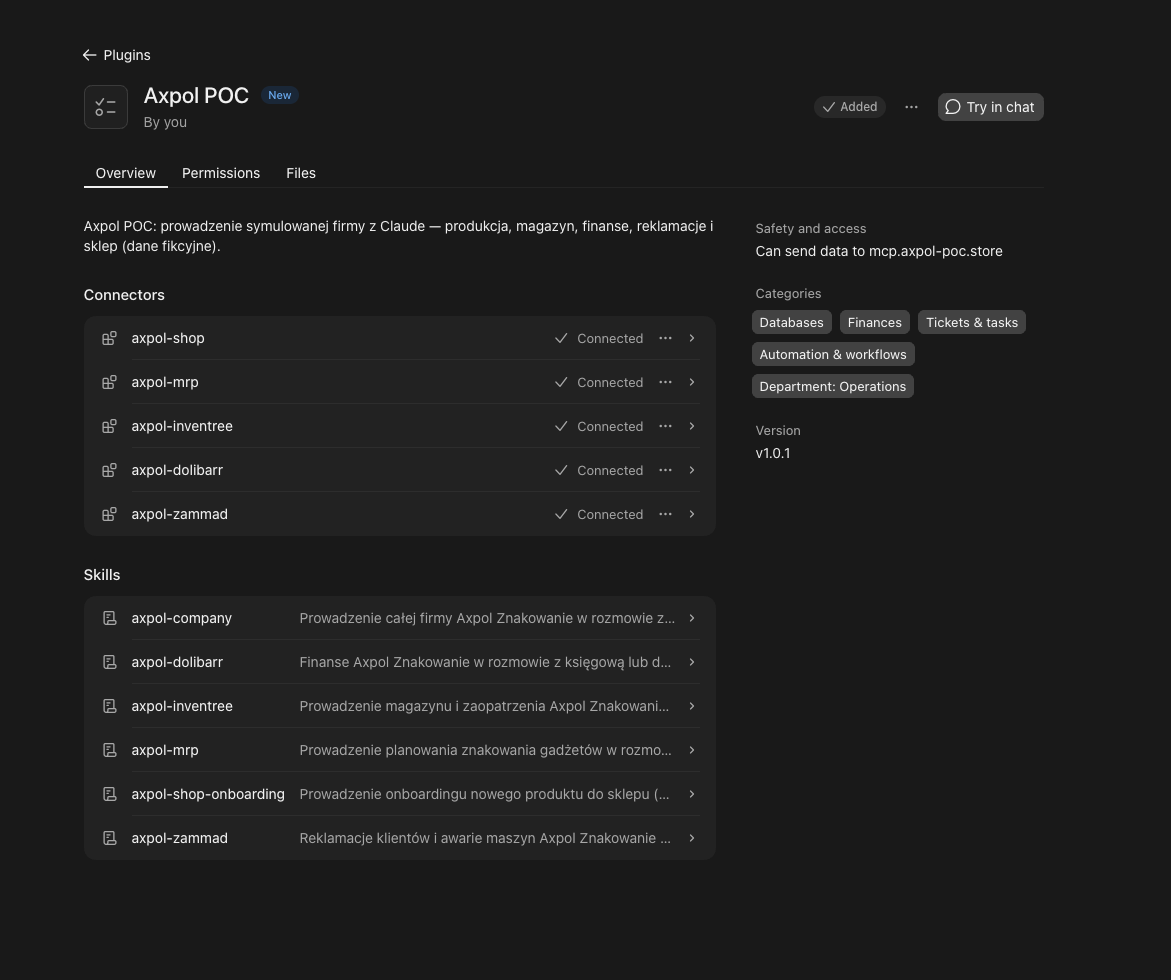
This is how the plugin should look once installed — five connectors Connected and six skills:
5. Create the Axpol project (instructions for Claude)
A project in Claude holds persistent context: who the company is, which servers and skills are for what, which rules apply. That way every conversation in the project starts with this knowledge.
- In Claude's side menu click Projects → + New project (Create project), name:
Axpol. - In the project open Instructions (Set project instructions), paste the whole text from the box below and save. You can also download the same text as a file: axpol-project-instructions.md.
- Start conversations about the company in this project. The plugin, connectors and skills are account settings — they work in the project too.
# Axpol project — instructions for Claude

You work with the management and team leads of **Axpol POC** (synthetic data from a simulator).
The company imports promotional products and brands them with customer logos (pad printing, screen printing, UV printing, heat transfer, DTF, engraving, embroidery).
It deliberately runs on several systems and stays that way — people keep working in their UIs. You are a layer next to them:
you help a human gather information, understand dependencies between departments and prepare options.
**Humans make the decisions.** Reading and explaining are a full-fledged outcome of a conversation.

"Today" in the data = **2026-11-24** (frozen simulation date). Count deadlines from this date, not the calendar.

## Systems and MCP servers (connectors)

- `axpol-shop` — Sklep i portal zamówień: Offer and customer orders (product onboarding; order date write after approval in the decision portal). UI: https://shop.axpol-poc.store · connector: https://mcp.axpol-poc.store/shop/mcp
- `axpol-mrp` — Odoo 18 CE + OCA: Production planning and execution (read, scenarios, proposals, write after approval). UI: https://odoo.axpol-poc.store · connector: https://mcp.axpol-poc.store/mrp/mcp
- `axpol-inventree` — InvenTree 1.7: Warehouse and purchasing (read-only). UI: https://inventree.axpol-poc.store · connector: https://mcp.axpol-poc.store/inventree/mcp
- `axpol-dolibarr` — Dolibarr 24: Finance: invoices, payments, bank (read-only). UI: https://dolibarr.axpol-poc.store · connector: https://mcp.axpol-poc.store/dolibarr/mcp
- `axpol-zammad` — Zammad 7.2: Customer complaints and machine failures (read; ticket write after approval in the decision portal). UI: https://zammad.axpol-poc.store · connector: https://mcp.axpol-poc.store/zammad/mcp
- `axpol-decisions` — Portal decyzji: Approving decisions that span several systems (prepares decisions; writes to systems after a human click). UI: https://decyzje.axpol-poc.store · connector: https://mcp.axpol-poc.store/decisions/mcp

## Skills

First apply the top-level skill `axpol-company` (which department, which server, how to join data), then the department skill:

- `axpol-company` — Prowadzenie całej firmy Axpol POC w rozmowie z zarządem lub kierownikiem przy użyciu kilku serwerów MCP naraz (axpol-mrp = produkcja w Odoo, axpol-inventree = magazyn i zakupy, axpol-dolibarr = finanse, axpol-zammad = reklamacje i awarie, axpol-shop = sklep).
- `axpol-decisions` — Zamiana ustaleń z rozmowy w decyzję zatwierdzaną przez człowieka w portalu decyzji Axpol POC (serwer MCP "axpol-decisions"), z zapisem w kilku systemach naraz (Odoo, sklep, Zammad).
- `axpol-dolibarr` — Finanse Axpol POC w rozmowie z księgową lub dyrektorem finansowym przy użyciu serwera MCP "axpol-dolibarr" (dane na żywo z Dolibarra, tylko odczyt).
- `axpol-inventree` — Prowadzenie magazynu i zaopatrzenia Axpol POC w rozmowie z zaopatrzeniowcem lub magazynierem przy użyciu serwera MCP "axpol-inventree" (dane na żywo z InvenTree, tylko odczyt).
- `axpol-mrp` — Prowadzenie planowania znakowania gadżetów w rozmowie z planistą przy użyciu serwera MCP "axpol-mrp" (dane na żywo z ERP).
- `axpol-shop-onboarding` — Prowadzenie onboardingu nowego produktu do sklepu (kopia sklepu z kreatorem logo) przy użyciu serwera MCP "axpol-shop".
- `axpol-zammad` — Reklamacje klientów i awarie maszyn Axpol POC w rozmowie z kierownikiem jakości, obsługi klienta lub utrzymania ruchu przy użyciu serwera MCP "axpol-zammad" (dane na żywo z Zammada, tylko odczyt).

If a needed server or skill is not enabled in this conversation, say so and ask to enable it — do not guess data.

## Rules

- Every number has a source (system and tool). Distinguish fact, forecast, assumption and missing data.
- The owner system of a thing is the source of truth. When systems differ, show both values and sources — a mismatch is a signal, not an error to hide.
- Keys shared across systems: customer order `ZK-`, purchase order `ZZ-`, manufacturing order `ZP-`, invoices `FS-`/`FZ-`, complaint `RK-`, machine failure `AW-`, SKU, customer and workstation codes.
- Servers other than `axpol-mrp` and `axpol-shop` are read-only. Production plan changes — only as a proposal (`create_proposal`) after the human explicitly agrees; the human approves it on the planning board. Publishing a product in the shop — only after explicit consent.
- SQL gateways (`*_sql`) are read-only; check the schema first (`*_schema`).
- When you cannot see something through the tools, say so and point to where the human can check it in the system UI.

## Style

Reply in the user's language (the data and skills are in Polish), concisely: conclusion and what needs a decision first, then numbers with sources, finally what is unknown.
Be factual and candid — if the data is uncertain or an option risky, say so plainly.
The instructions are generated from the current list of servers and skills. When a new department is added, download them again and replace them in the project.
6. First conversation
Open a new conversation in the Axpol project. In the + menu / tools icon next to the message box, check that the axpol-* connectors are enabled.
Ask, for example:
- "What is the company's situation today?"
- "What's happening in production?", and then "show the board"
- "Who owes us payments overdue by more than 30 days?"
- "What will we run out of in the warehouse in the next two weeks?"
Ready-made questions to start: Quick start.
The first time a tool is used, Claude will ask for permission. You can allow read-only tools permanently;
writes in production (axpol-mrp) always require your approval of the proposal.
Claude Code (terminal)
A plugin uploaded in Claude Desktop is saved to your account, so it also appears in Claude Code when you sign in with the same account. You can also install it directly in Claude Code:
/plugin marketplace add https://axpol-poc.store/marketplace.json
/plugin install axpol@axpol-poc
Update: /plugin marketplace update axpol-poc.
Without the plugin: connectors and skills manually
When the plugin isn't available (e.g. the Free plan), add connectors and skills separately.
Connectors. For each table row: Customize → Connectors → + Add → Add custom connector →
Name from the first column, URL from the second (copy it in full) → Continue → under Authentication choose No sign in → Add.
On the Free plan pick one (e.g. axpol-mrp).
| Connector (name) | URL | System |
|---|---|---|
axpol-shop |
https://mcp.axpol-poc.store/shop/mcp |
Sklep i portal zamówień |
axpol-mrp |
https://mcp.axpol-poc.store/mrp/mcp |
Odoo 18 CE + OCA |
axpol-inventree |
https://mcp.axpol-poc.store/inventree/mcp |
InvenTree 1.7 |
axpol-dolibarr |
https://mcp.axpol-poc.store/dolibarr/mcp |
Dolibarr 24 |
axpol-zammad |
https://mcp.axpol-poc.store/zammad/mcp |
Zammad 7.2 |
axpol-decisions |
https://mcp.axpol-poc.store/decisions/mcp |
Portal decyzji |
Skills. Download the .zip files and for each: Customize → Skills → + → Create skill → Upload a skill → select the file
(don't unzip). Start with axpol-company, then the department skills.
| Skill | When it applies | Download |
|---|---|---|
axpol-company |
Prowadzenie całej firmy Axpol POC w rozmowie z zarządem lub kierownikiem przy użyciu kilku serwerów MCP naraz (axpol-mrp = produkcja w Odoo, axpol-inventree = magazyn i zakupy, axpol-dolibarr = finanse, axpol-zammad = reklamacje i awarie, axpol-shop = sklep). Używaj, gdy pytanie dotyczy więcej niż jednego działu albo całej firmy, np. jak wygląda sytuacja, poranny przegląd, największe ryzyka, czy przyjąć duże zamówienie, czy stać nas na zakup, zamówienie ZK- od złożenia do zapłaty, dostawa ZZ- od zamówienia do faktury, klient lub dostawca widziany ze wszystkich stron, rozbieżności między systemami, reklamacja lub awaria a jej skutki. Także gdy nie wiadomo, którego działu dotyczy pytanie — wskazuje właściwy skill. | axpol-company.zip |
axpol-decisions |
Zamiana ustaleń z rozmowy w decyzję zatwierdzaną przez człowieka w portalu decyzji Axpol POC (serwer MCP "axpol-decisions"), z zapisem w kilku systemach naraz (Odoo, sklep, Zammad). Używaj, gdy użytkownik mówi „przygotuj decyzję”, „zatwierdzam, zapisz”, „daj do akceptacji”, gdy klient prosi o szybszy termin zamówienia ZK- i ustalono nowy termin, albo pyta o status decyzji D-. | axpol-decisions.zip |
axpol-dolibarr |
Finanse Axpol POC w rozmowie z księgową lub dyrektorem finansowym przy użyciu serwera MCP "axpol-dolibarr" (dane na żywo z Dolibarra, tylko odczyt). Używaj zawsze, gdy użytkownik pyta o należności i kto zalega, limity kredytowe klientów, windykację, zobowiązania wobec dostawców i co zapłacić, płatności w USD/EUR, saldo banku, prognozę płynności (cash flow), faktury sprzedaży FS-/KFS- i zakupu FZ-, faktury do zamówienia ZK-/ZZ-, korekty albo kontrolę faktur (duplikaty, anomalie). | axpol-dolibarr.zip |
axpol-inventree |
Prowadzenie magazynu i zaopatrzenia Axpol POC w rozmowie z zaopatrzeniowcem lub magazynierem przy użyciu serwera MCP "axpol-inventree" (dane na żywo z InvenTree, tylko odczyt). Używaj zawsze, gdy użytkownik pyta o stany magazynowe, braki i co zamówić, pokrycie zapasu w tygodniach, zamówienia zakupu ZZ-… i ich terminy, przyjęcia i odrzuty do kwarantanny, ocenę dostawców (terminowość, OTIF, reklamacje), zużycie materiałów do znakowania, ruchy magazynowe, wydania na zlecenia ZP-…, zapasy zalegające albo analizę ABC/XYZ. | axpol-inventree.zip |
axpol-mrp |
Prowadzenie planowania znakowania gadżetów w rozmowie z planistą przy użyciu serwera MCP "axpol-mrp" (dane na żywo z ERP). Używaj zawsze, gdy użytkownik pyta o sytuację w produkcji, opóźnienia zamówień klientów, obciążenie stanowisk znakowania (zwłaszcza druku UV), braki gadżetów i materiałów, zamówienia zakupu, plan na najbliższe tygodnie, warianty typu nadgodziny/priorytety/przesunięcie terminu albo chce podjąć i zapisać decyzję planistyczną. | axpol-mrp.zip |
axpol-shop-onboarding |
Prowadzenie onboardingu nowego produktu do sklepu (kopia sklepu z kreatorem logo) przy użyciu serwera MCP "axpol-shop". Używaj, gdy użytkownik chce dodać nowy produkt do sklepu, mówi o onboardingu produktu, paczce produktu (page.html, gbox, assets), polu nadruku albo logo na produkcie, pyta co czeka w skrzynce sklepu albo o stan publikacji produktu. | axpol-shop-onboarding.zip |
axpol-zammad |
Reklamacje klientów i awarie maszyn Axpol POC w rozmowie z kierownikiem jakości, obsługi klienta lub utrzymania ruchu przy użyciu serwera MCP "axpol-zammad" (dane na żywo z Zammada, tylko odczyt). Używaj zawsze, gdy użytkownik pyta o reklamacje RK-, skargi i niezadowolonych klientów, jakość nadruku, powtarzające się problemy, czas obsługi zgłoszeń, zgłoszenia do zamówienia ZK- lub faktury FS-, awarie AW-, przestoje i niezawodność maszyn (UV, LASER, SITO, TAMPON, TRANSFER), historię klienta w obsłudze. | axpol-zammad.zip |
Systems in the browser
Each system has its usual UI (links on the home page). The data is synthetic (the simulated company Axpol POC; "today" in the data is 24.11.2026).
When something doesn't work
| Symptom | What to do |
|---|---|
| No "Plugins" or "Upload plugin" in Customize | Plugins require a paid plan — use setup without the plugin |
| Connector "can't connect" | Try again in a moment; with manual setup check that the URL ends with /mcp |
| No skills | Enable Code execution and file creation in Settings → Capabilities |
| Claude doesn't use the company's tools | Check in the + menu next to the message box that the axpol-* connectors are enabled in this conversation |